
Retail today is driven by data. To compete in a fast-paced, customer-centric market, retailers must go beyond traditional analytics and embrace Business Intelligence (BI) as a foundational strategy. BI refers to technologies, practices, and tools that collect, process, and analyze business data to deliver actionable insights. For retail, this means better understanding consumer behavior, optimizing supply chains, and personalizing shopping experiences across every touchpoint.
This article explores the key use cases, benefits, and technologies shaping BI in the retail sector—and how businesses can successfully implement BI to unlock scalable, data-driven growth.
Operations and logistics managers aiming to optimize processes.
Digital transformation leaders exploring scalable BI solutions.
IT and data professionals assessing modern BI tools for retail.
E-commerce managers improving personalization and performance.
- BI in retail enables smarter decisions by transforming raw data into actionable insights across marketing, operations, finance, and supply chain.
- Use cases include demand forecasting, fraud detection, customer segmentation, and pricing optimization.
- Top modern BI tools for retail include Tableau, Microsoft Power BI, Looker, and Qlik — chosen for scalability and integration capabilities.
Key Business Intelligence Use Cases in Retail
- Product Assortment Optimization
Identify the right mix of SKUs for specific store locations, channels, and customer segments. BI helps evaluate product performance, profitability, and uniqueness, while streamlining planning across physical and digital shelves. - Customer Insights
Track behavior patterns across websites, apps, and stores. Combine transactional data with engagement metrics to segment audiences, refine targeting, and improve conversion rates. - Marketing Intelligence
Monitor campaign performance in real-time. Use BI dashboards to evaluate spend efficiency, test messaging strategies, and maximize ROI through dynamic A/B testing and segmentation. - Location Intelligence
Analyze demographic and behavioral data to inform store openings, closures, or layout adjustments. BI helps optimize real estate decisions based on footfall patterns and regional buying habits. - Dynamic Pricing
Integrate competitor benchmarking and real-time demand forecasts to update pricing strategies. Automated tools can help balance margin goals with promotional effectiveness. - Supply Chain Visibility
Use near real-time insights to reduce stockouts, optimize inventory distribution, and align demand with supplier timelines. - Sales Intelligence
Combine historical sales data, external trends, and predictive modeling to forecast future performance and empower frontline teams with actionable insights.
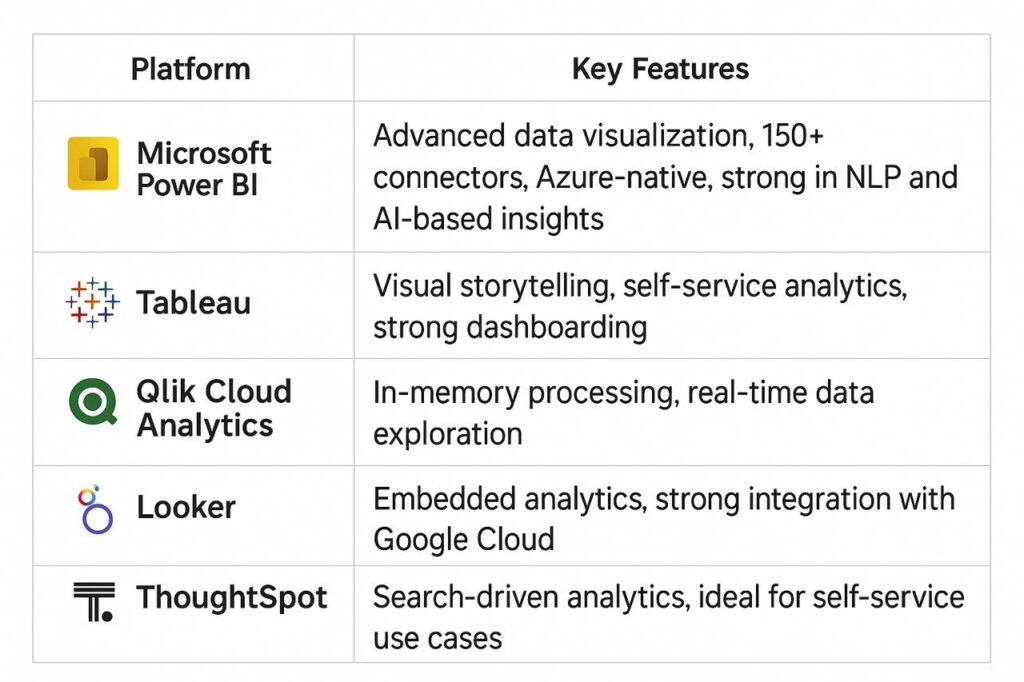
BI Technology Stack: Platforms and Integrations
Retail BI platforms must integrate seamlessly with POS systems, CRM, ecommerce platforms, supply chain tools, and marketing software.
Retail BI Implementation: Key Considerations
Implementing Business Intelligence (BI) in retail is not just about adopting the right software—it’s about transforming raw data from diverse retail channels into actionable insights that directly impact revenue, efficiency, and customer experience.
To succeed, retailers must carefully evaluate several strategic and operational factors before, during, and after the BI rollout.
- Define Clear Business Objectives
Before investing in BI tools, retail companies should identify the specific problems they aim to solve. Whether it’s optimizing inventory, predicting demand, personalizing marketing, or improving supply chain efficiency, clear objectives will guide both technology selection and data strategy.
Key questions to answer:
What retail KPIs will BI help improve?
Which processes are bottlenecks today?
What competitive advantages should the BI system unlock?
- Data Integration Across Channels
Retailers collect data from multiple sources—POS systems, e-commerce platforms, loyalty programs, supply chain systems, and third-party market data.
BI success depends on seamless integration across all these channels.
Best practice: Invest in ETL (Extract, Transform, Load) or ELT pipelines that ensure data accuracy, remove duplicates, and allow near real-time updates. This enables unified reporting, such as comparing in-store and online sales performance side by side.
- Real-Time Analytics for Decision-Making
In modern retail, waiting days for reports can mean missed sales opportunities. BI platforms should support real-time or near-real-time analytics so that pricing, promotions, and inventory decisions can be adjusted on the fly.
Example: A fashion retailer can detect in hours—not weeks—which product lines are trending and quickly adjust marketing spend.
- User Adoption and Training
A technically perfect BI implementation can fail if store managers, merchandisers, and executives do not actively use it. Retail BI tools should feature intuitive dashboards and require minimal technical skills for basic queries.
Training essentials:
Role-based dashboards (store-level, regional, corporate).
Hands-on workshops with real retail data.
Internal BI champions to drive adoption.
- Scalability and Future-Proofing
Retail BI systems should handle seasonal spikes (e.g., Black Friday), expand with new store locations, and integrate future analytics capabilities like AI-based demand forecasting. Choosing a cloud-native BI solution (e.g., Power BI, Looker, Tableau Cloud) ensures elasticity and lower infrastructure overhead.
- Data Security and Compliance
Retailers deal with sensitive customer data (payment info, personal identifiers) and must comply with GDPR, CCPA, and other privacy regulations. BI implementations should include role-based access controls, data masking, and secure cloud storage to protect sensitive information.
- Performance Metrics and Continuous Improvement
BI implementation is an ongoing process. Retailers should monitor BI adoption rates, data accuracy levels, and how insights impact KPIs. Regular feedback loops between IT, analytics teams, and business users help refine dashboards, reports, and data models over time.
In the age of omnichannel, BI empowers retailers to see the full picture—online, in-store, and everywhere in between—so they can act faster than the market shifts.
Linda Chen, Senior Data Architect
Summary Table: Retail BI Implementation Checklist
Benefits of BI for Retailers:
- Improved Customer Experience: Enable hyper-personalization across touchpoints.
- Targeted Marketing: Track ROI and refine audience targeting based on real behavior.
- Supply Chain Efficiency: Reduce waste, prevent overstocking, and respond quickly to demand changes.
- In-Store Optimization: Use data to plan floor layouts, product placements, and seasonal strategies.
- Competitive Edge: Benchmark against market leaders and adapt strategies in real-time.
Conclusion
Retailers equipped with a modern BI solution can outmaneuver slower competitors by turning massive volumes of data into strategic insight. From managing inventory to anticipating customer needs, BI enables smarter decisions that translate into measurable results. As BI technology becomes more accessible, it is no longer just a tool for IT or analytics teams—it is a core capability for every forward-thinking retail organization.
Why Ficus Technologies?
At Ficus Technologies, we help retail businesses unlock value from their data with tailored BI solutions. From architecture to dashboards, we design systems that scale with your business and enable smart, fast decisions. Whether you’re optimizing a legacy workflow or launching a new omnichannel strategy, we provide the BI expertise and tech support to get results — fast.
It’s the use of analytics and reporting tools to extract insights from retail data, supporting smarter decisions across departments.
Not at all — scalable BI platforms now serve businesses of all sizes, from niche e-commerce brands to global chains.
It depends on your data maturity. With an experienced partner, first insights can be live in weeks — not months.
BI helps cut costs, increase revenue, and reduce decision-making risk. Retailers often see ROI within the first year through better demand planning and improved customer targeting.





 Success...!